Three Ways to Fail Over: LoadBalancer, Sentinel, and Cluster on the Zaris RESP Front-End

· 6 min read
Clustron Team
Distributed Systems Engineering

Three ways to fail over on the Zaris RESP front-end

Zaris exposes a Redis-protocol (RESP) front-end so any Redis client, in any language, can point at a Zaris cluster and use it as a drop-in store. But "any Redis client" hides a real problem: Redis client ecosystems do not agree on how to discover topology or how to recover when a node disappears. A plain client expects a single stable endpoint. A Sentinel-based client expects to ask a discovery service "who is the master?" A cluster-mode client expects hash slots and MOVED/ASK redirects.

If a store spoke only one of those dialects, a whole class of clients would be locked out. So the Zaris RESP front-end supports three failover models, each matching how a particular family of Redis clients already expects to work. You pick the model per deployment; the client behaves exactly as it would against real Redis.

One honest note up front, because it shapes everything below: all three models sit in front of the same replicated, partitioned Zaris store. The model you choose changes discovery and redirection semantics — how a client finds a node and what it does when one fails — not where your data actually lives.

Redis Streams, Natively: Append-Only Logs, Consumer Groups, and Blocking Reads

· 6 min read
Clustron Team
Distributed Systems Engineering

A native, replicated append-only log with consumer groups and blocking reads in Zaris

Zaris already speaks in collections — hashes, lists, sets, and sorted sets that live on the server and replicate like any other key. Streams are the fifth kind, and they're the one that turns Zaris from a store into a piece of messaging infrastructure.

A Zaris stream is a real append-only log: entries get monotonic IDs, you can read ranges, and you can attach consumer groups so a pool of workers divides the log between them, tracks per-consumer pending entries, and acknowledges what it has processed. You can also do a blocking read — a consumer parks and waits until new entries arrive instead of hot-looping.

And because it's a native Zaris collection, the log is partitioned and replicated exactly like everything else. A stream survives a node failover, which is the whole reason to reach for durable messaging in the first place.

Data Structures That Replicate: Hashes, Lists, Sets, and Sorted Sets in Zaris

· 6 min read
Clustron Team
Distributed Systems Engineering

Native hashes, lists, sets, and sorted sets, replicated like every other key in Zaris

Zaris 1.x stored values. Zaris 2.0.0 stores collections. Hashes, lists, sets, and sorted sets are now first-class, server-side types with real, typed .NET APIs — and, just as importantly, they behave like everything else in the store.

That last part is what people usually get wrong. In a lot of systems, "data structures" are a client-side illusion: a library serializes a dictionary into a blob, Puts it, and calls that a hash. It works until two clients touch the same collection at once, or until you ask what happens on a failover. In Zaris, a hash is a hash on the server. It sits on the partition that owns its key, it replicates to that partition's replica, and it survives a node loss exactly the way a plain key does.

Zaris 2.0.0: Native Data Structures, Streams, and a Redis-Protocol Front-End

· 7 min read
Clustron Team
Distributed Systems Engineering

Zaris 2.0.0 — Native data structures, Streams, and a Redis-protocol front-end

Today we're shipping Zaris 2.0.0 — the biggest release since Zaris reached general availability, and the first with a major version bump. It turns Zaris from a fast, replicated key/value store into a full data-structure server: native hashes, lists, sets, sorted sets, pub/sub, and Redis Streams, all partitioned and replicated the same way your keys already are.

And it opens the door to everyone else. Every node can now expose a Redis-protocol (RESP) front-end, so an application in Python, Ruby, Java, Go — any language with a Redis client — can point at Zaris and use it as a drop-in, without a native SDK and without rewriting a line.

The version number is a 2, not a 1.x, for a reason: 2.0.0 changes the wire. Read the upgrade note below before you roll it out.

Any Language, One Store: How Zaris Speaks the Redis Protocol

· 7 min read
Clustron Team
Distributed Systems Engineering

Any language, one store

Zaris is a distributed key/value store built natively for .NET. Its first-class clients speak an efficient binary protocol, and if your stack is .NET, that's the path you want — real async APIs, .NET types, coordination primitives, IDistributedCache and HybridCache drop-ins.

But most systems aren't only .NET. There's a Python service doing data work, a Go sidecar, a Ruby job runner, a Node gateway. Rewriting all of them onto a new client to try a new store is a non-starter. So in 2.0.0, every Zaris node can also expose a Redis-protocol (RESP2) listener: point an existing Redis client at it and use Zaris as a drop-in key/value store, in any language, without changing a line of client code.

This post is about how that front-end actually works — the routing model, the data model, the failover models, and exactly which commands are in and out.

Reads That Scale With Your Cores

· 5 min read
Clustron Team
Distributed Systems Engineering

Zaris GET throughput scales with cores

Redis is fast. It is also, by design, single-threaded on the data path: one event loop, one core, one command at a time. That's a genuinely good design — it makes Redis simple to reason about and removes a whole category of concurrency bugs. But it has a ceiling you can't buy your way out of. Give a single-event-loop engine a 4-core box, an 8-core box, a 32-core box, and read throughput lands in the same place. The extra cores sit idle.

Zaris takes the other road. Keys are partitioned and each partition has an owner, so reads for different keys land on different cores and run at the same time. The result is throughput that moves when you add cores — instead of a flat line, a slope.

Coming From Redis: Pointing Your .NET App at Zaris

· 5 min read
Clustron Team
Distributed Systems Engineering

Two paths from Redis to Zaris

If your .NET services already talk to Redis, moving to Zaris doesn't have to be a rewrite. Zaris is a distributed, in-memory, replicated key/value store built natively for .NET — and as of 2.0.0 it speaks two protocols at once: its own efficient binary protocol for first-class .NET clients, and a Redis-compatible RESP2 front-end that any Redis client in any language can point at.

That gives you two honest migration paths, and they're not mutually exclusive. You can start with the zero-change RESP path to get Zaris under load today, then adopt the native client where it pays off. This post walks both, and gives you a clear rule for picking.

Zaris 0.9.0 Is Here — and It's Generally Available

· 4 min read
Clustron Team
Distributed Systems Engineering

Zaris 0.9.0 — Generally Available

Today we're shipping Zaris 0.9.0, and with it, Zaris hits general availability. It's production-ready, cross-platform, and now backed by commercial support.

If you haven't run into it yet: Zaris is a distributed, in-memory key/value store for .NET. It's fast, replicated, and you can operate it from a browser, PowerShell, or straight from your app. This release is the culmination of that work — the point where "promising project" becomes "thing you can put in production."

Build Reactive Systems with Clustron Watch

· 5 min read

Most distributed systems don’t start out complicated.

They begin with something simple — a loop.

You write a small worker that checks for work:

while (true)
{
var job = await client.GetAsync<Job>("jobs:next");

if (job.IsSuccess)
{
await ProcessAsync(job.Value);
}

await Task.Delay(1000);
}

At this stage, everything feels reasonable. The logic is clear, the system behaves predictably, and there is very little cognitive overhead.

But as the system grows, this pattern quietly becomes one of the most expensive parts of your architecture.


The Hidden Cost of Polling in Distributed Systems​

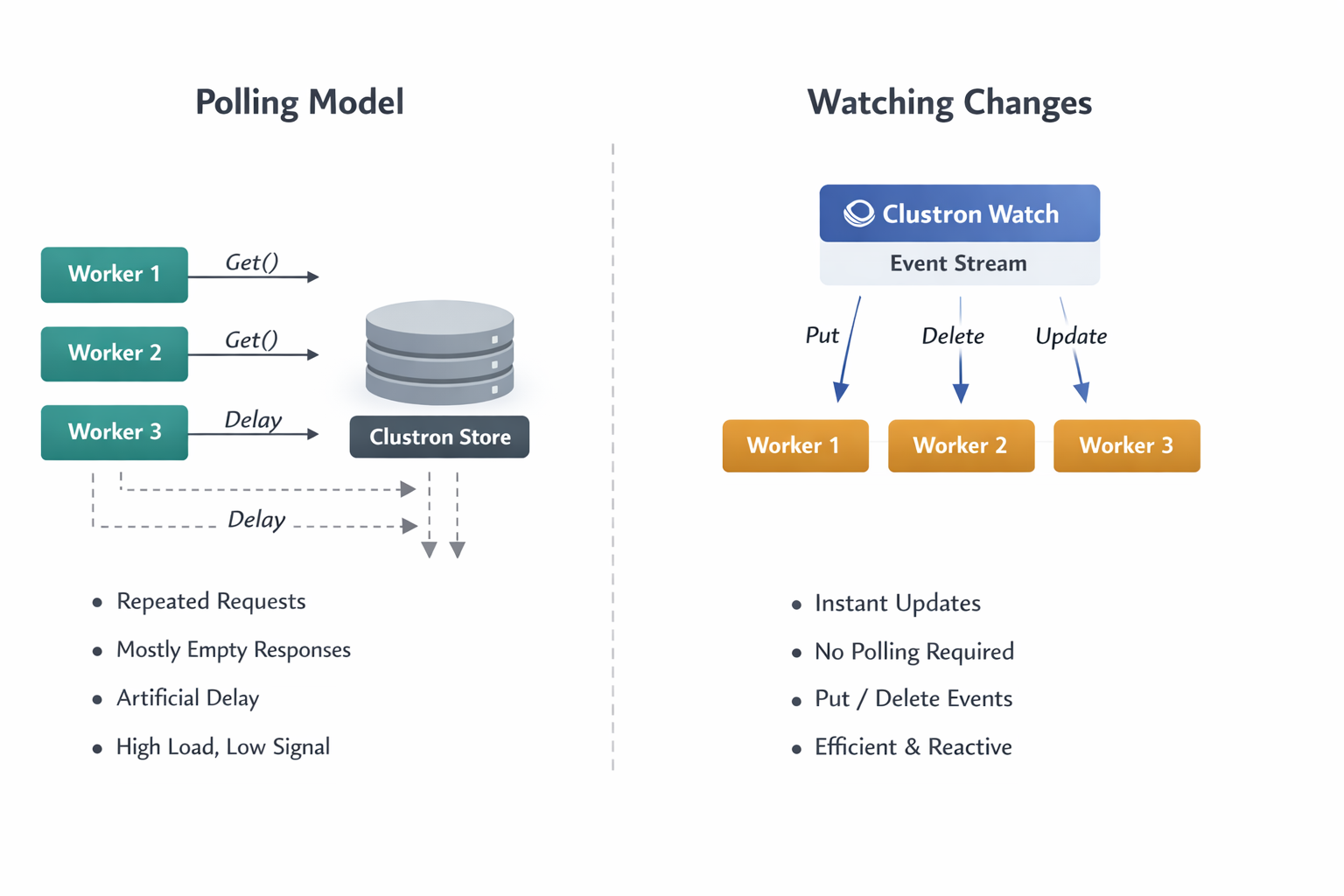
Polling introduces a fundamental inefficiency: you are repeatedly asking the system for changes that usually haven’t happened.

As you scale:

  • Multiple instances begin polling the same data
  • Each instance performs repeated reads, most of which return no useful information
  • You introduce artificial latency — changes are only detected on the next polling cycle
  • The system starts consuming resources simply to confirm that nothing has changed

This leads to a system that is technically correct, but operationally inefficient.

More importantly, polling forces you to make tradeoffs you shouldn’t have to make:

  • Poll frequently → higher cost, lower latency
  • Poll less frequently → lower cost, higher latency

There is no correct answer — only compromise.


A Different Model: Reacting Instead of Asking​

The alternative is not just an optimization — it is a different way of thinking about systems.

Instead of asking:

“Has something changed?”

You design your system to respond to:

“Something just changed.”

This is the shift from a pull-based model to a push-based model.

In Clustron, this is implemented through Watch.

Polling model vs watching changes


Introducing Watch: A Stream of State Changes​

Clustron Watch allows you to subscribe to changes in the system and receive events as they happen.

At its core, Watch turns your data into a continuous stream of updates.

Watching a Single Key​

var (subscription, initialRecord) = await client.Watch.WatchKeyAsync(
"order:1001",
new WatchOptions { IncludeInitialSnapshot = true },
ev =>
{
Console.WriteLine($"{ev.EventType} → {ev.Key} = {ev.Value}");
});

This does two important things:

  1. It gives you the current state (initialRecord)
  2. It subscribes you to all future changes

This combination is critical. Without it, you would have to manually fetch the current value and then subscribe — which introduces race conditions.


Snapshot + Streaming: A Correctness Guarantee​

One of the subtle but essential aspects of Watch is the ability to include an initial snapshot.

When IncludeInitialSnapshot is enabled:

  • You receive the current value at the time of subscription
  • You then receive all subsequent updates in order

This ensures that:

  • You do not miss existing state
  • You do not miss future changes
  • You do not need additional synchronization logic

In other words, Watch provides a complete and consistent view of state evolution.


Watching Collections: Moving Beyond Single Keys​

While watching a single key is useful, most real systems operate on groups of related data.

Clustron supports this through prefix-based watching:

var subscription = await client.Watch.WatchPrefixAsync(
"jobs:",
new WatchOptions { IncludeInitialSnapshot = false },
ev =>
{
Console.WriteLine($"Job update: {ev.Key}");
});

This allows you to observe all changes within a logical group.

From an architectural perspective, this is where Watch becomes significantly more powerful:

  • You are no longer reacting to individual values
  • You are reacting to system-wide state transitions

Understanding the Event Model​

Each change in the system produces a WatchEvent.

A typical event contains:

  • The key that changed
  • The type of change (Put or Delete)
  • The new value (if applicable)
  • A revision representing the version of the change

This revision is particularly important. It provides ordering and allows you to reason about the sequence of events across a distributed system.

Effectively, Watch gives you a log of state transitions, delivered in real time.


What This Enables in Practice​

Once you adopt this model, several common problems become simpler.

Job Processing​

Instead of polling for new work, workers react immediately when jobs are created or updated.

This removes idle cycles and reduces latency.


Cache Invalidation​

Rather than relying on TTL or periodic refresh, caches can update themselves in response to actual changes.

This improves both freshness and efficiency.


Distributed Coordination​

Systems that rely on shared state — such as leader election or lease ownership — benefit significantly from real-time updates.

Changes propagate instantly, allowing faster and more reliable coordination.


Presence and Monitoring​

Tracking active components becomes trivial:

  • When a node appears → you receive an event
  • When a node disappears → you receive an event

No polling, no guessing.


Operational Considerations​

Watch is designed for long-running, event-driven workloads.

A few important considerations:

Keep Handlers Lightweight​

Your event handler should not perform heavy work directly.

Instead:

  • Process quickly
  • Delegate heavier tasks to background workers

Manage Subscription Lifecycle​

Always stop subscriptions when they are no longer needed:

await subscription.StopAsync();

This ensures resources are released cleanly.


Understand Scope​

  • Watching a key → only that key produces events
  • Watching a prefix → only matching keys produce events

Events are scoped and isolated, which prevents unintended cross-talk between components.


From Polling Loops to Reactive Systems​

The shift from polling to watching is not just about performance.

It changes the structure of your application.

Polling systems are built around:

Loop → Check → Wait → Repeat

Reactive systems are built around:

Event → Handler → Action

This results in systems that are:

  • More responsive
  • More efficient
  • Easier to reason about

Final Thoughts​

Polling is often the simplest way to get started, and in small systems, it works well enough.

But as systems grow, the cost of polling becomes increasingly difficult to justify.

Clustron Watch offers a different approach — one where your system reacts to change rather than searching for it.

Stop asking your system if something changed.

Let it tell you when it does.

Getting Started​

Try a simple watch:

await client.Watch.WatchPrefixAsync("orders:", null, ev =>
{
Console.WriteLine($"{ev.Key} updated");
});

From there, start removing polling loops — one at a time.

You’ll quickly find that your system becomes not just faster, but fundamentally simpler.

Distributed Caching in .NET

· 4 min read

Caching is one of the most effective ways to improve the performance of an application.
Most .NET applications start with a simple in‑memory cache using MemoryCache or IMemoryCache. This works perfectly when the application runs on a single server.

However, modern applications rarely run on a single machine.

When applications scale horizontally across multiple instances, in‑memory caching stops working reliably. Each instance maintains its own cache, which means the application state becomes inconsistent across the cluster.

This is where distributed caching becomes essential.


Distributed Cache


The Problem with In‑Memory Caches

Consider a typical ASP.NET application deployed behind a load balancer.

          Load Balancer
|
---------------------------
| | |
Server A Server B Server C

Each server has its own memory cache.

If a request updates cached data on Server A, the caches on Server B and Server C remain outdated.

This leads to several problems:

  • inconsistent application state
  • stale cache entries
  • duplicate cache warmups
  • unpredictable behavior

To solve this problem, the cache must be shared across all nodes.


What is a Distributed Cache?

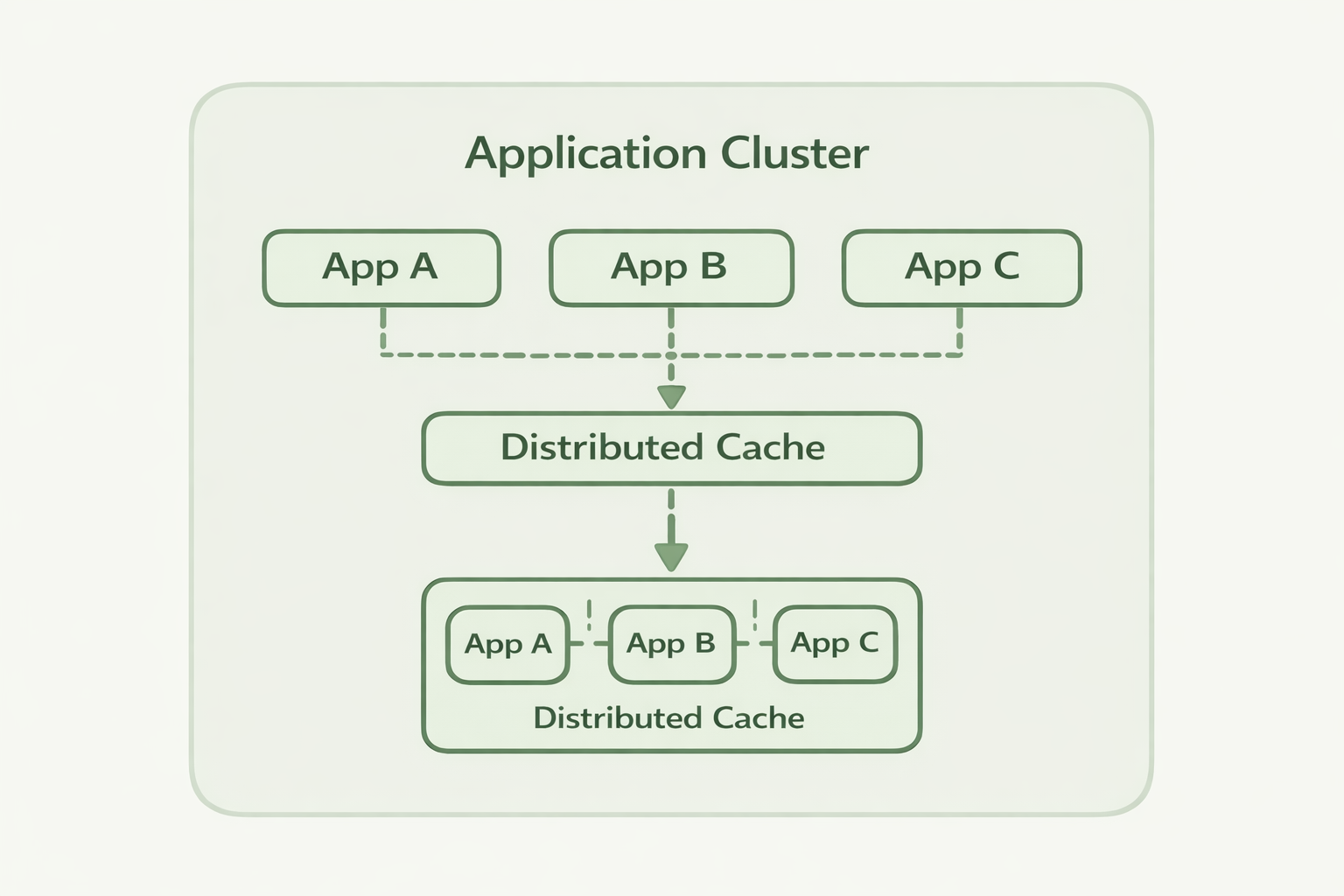
A distributed cache is a centralized or clustered cache that can be accessed by multiple application instances.

Instead of storing cached data inside the application process, the data is stored in a distributed key‑value store.

           Application Nodes

App A App B App C
| | |
+---------+---------+
|
Distributed Cache

All application nodes read and write cache entries from the same distributed store.

This ensures:

  • consistent cached data
  • shared application state
  • better scalability

Basic Distributed Cache Example in .NET

A distributed cache is typically used through an abstraction such as IDistributedCache.

Example:

public class ProductService
{
private readonly IDistributedCache _cache;

public ProductService(IDistributedCache cache)
{
_cache = cache;
}

public async Task<string?> GetProductAsync(string id)
{
var cached = await _cache.GetStringAsync(id);

if (cached != null)
return cached;

var product = await LoadProductFromDatabase(id);

await _cache.SetStringAsync(id, product);

return product;
}

private Task<string> LoadProductFromDatabase(string id)
{
return Task.FromResult($"Product {id}");
}
}

The application first checks the cache. If the value is missing, the data is loaded from the database and then stored in the cache.

This pattern is called cache‑aside caching.


Common Distributed Cache Solutions

Several technologies provide distributed caching capabilities.

Redis​

Redis is one of the most widely used distributed caches.

It provides:

  • key‑value storage
  • high performance
  • in‑memory operations

However, Redis often requires additional components when used for distributed coordination.


Database‑Backed Caches​

Some applications use relational databases as caches.

While simple, this approach introduces:

  • database contention
  • reduced performance
  • limited scalability

Distributed Key‑Value Platforms​

Modern distributed systems often use distributed key‑value platforms that provide both caching and coordination primitives.

These systems support:

  • distributed caching
  • distributed locks
  • leader election
  • change notifications
  • cluster coordination

Using Clustron as a Distributed Cache

Clustron provides a distributed key‑value platform designed for .NET applications.

Because it runs as a distributed cluster, all application instances interact with the same shared data store.

Example:

using Clustron.DKV.Client;

var client = await DKVClient.InitializeRemote(
"teststore",
new[]
{
new DkvServerInfo("localhost", 7861)
});

await client.PutAsync("product:1", "Laptop");

var value = await client.GetAsync<string>("product:1");

Console.WriteLine(value);

In this example:

  • application nodes connect to the cluster
  • data is stored in the distributed store
  • all nodes see the same data

This allows the cache to remain consistent across the entire cluster.


When to Use Distributed Caching

Distributed caching is especially useful in systems that:

  • run multiple application instances
  • process high request volumes
  • rely heavily on database reads
  • require shared application state

Typical use cases include:

  • ASP.NET web applications
  • microservices architectures
  • background processing systems
  • API platforms

Summary

In‑memory caching works well for single‑server applications, but modern distributed systems require a shared caching layer.

Distributed caching allows multiple application instances to share the same cached data, improving scalability and consistency.

Platforms such as Clustron provide a distributed key‑value store that makes it easy to implement distributed caching and coordination in .NET applications.